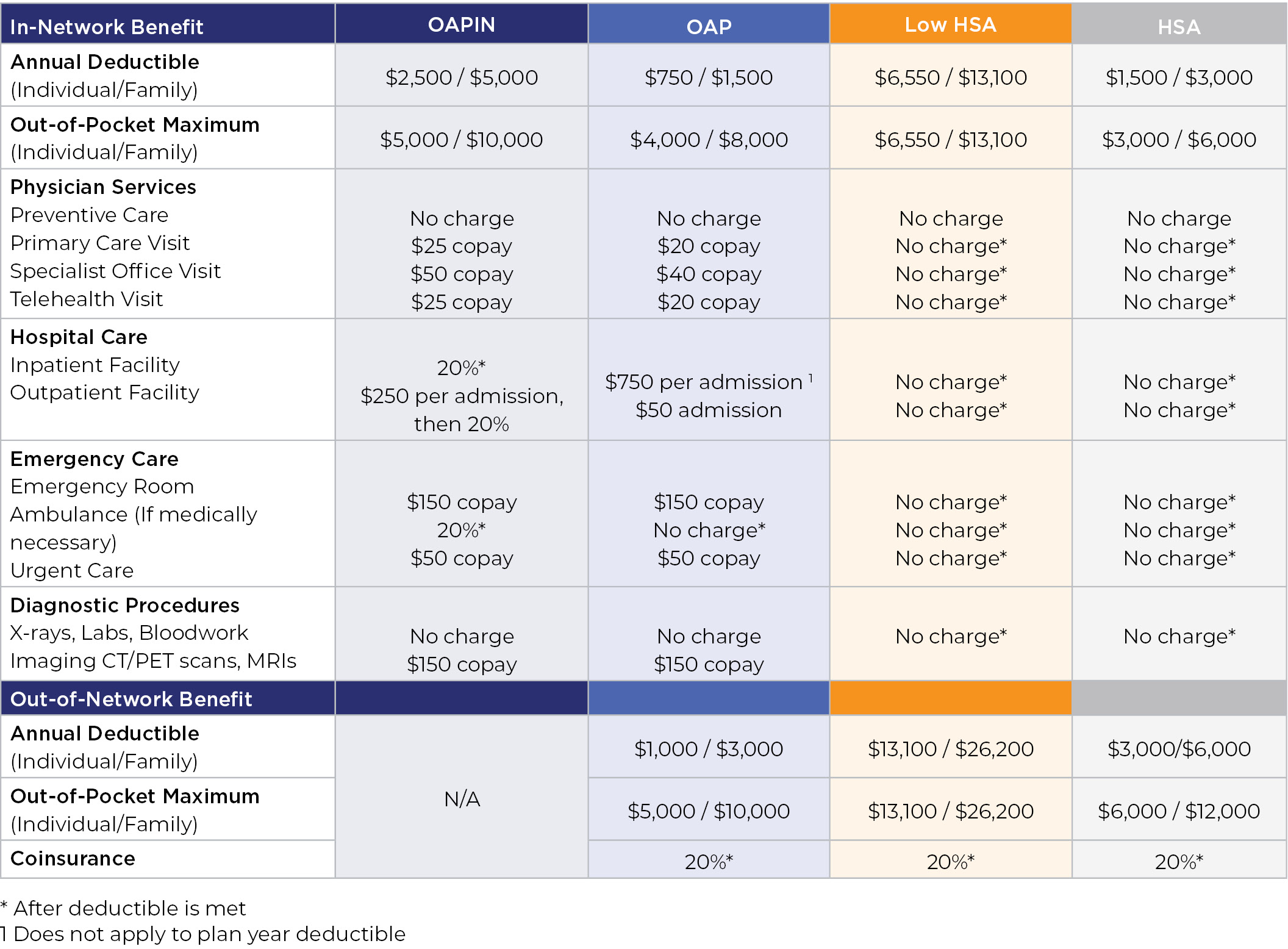
lnserso offers four medical plan options for you to select from.
There are two high deductible health plans that can be used in conjunction with a Health Savings Account (HSA).
You can also enroll in the Open Access Plus In-Network (OAPIN) plan, which is in-network coverage only, or you can opt for the Open Access Plus (OAP) plan, which provides the greatest flexibility with lower out-of-pocket expense at time of service.
All four medical plans utilize the Cigna “Open Access Plus” network. This is Cigna’s national network of physicians. Visit myCigna.com to locate providers in your area.
Is your doctor or hospital in your plan’s Cigna network? Cigna’s online directory makes it easy to find who (or what) you are looking for.
- Step 1: Go to myCigna.com, and click on “Find a Doctor” at the top of the screen. Then, under “How are you Covered?” select “Employer or School.”
If you are already a Cigna customer, log in to myCigna.com or the myCigna® app to search your current plan’s network. To search other networks, use the Cigna.com directory. - Step 2: Change the geographic location to the city/state or zip code you want to search. Select the search type and enter a name, specialty or other search term. Click on one of our suggestions or the magnifying glass icon to see your results.
- Step 3: Answer any clarifying questions, and then verify where you live (as that will determine the networks available)